Designing a CSV import flow
TL;DR:
→ Freelance product designer working on a CRM for beauty & lifestyle influencer marketing
→ Reframed a core user flow by questioning the problem definition, not just the design
→ Proactively redesigned for scale before it became an issue
→ Pushed back on a client feature request with a clear product rationale, and they agreed
→ Small team: one developer, one designer (me), so every decision had to weigh against what was realistic to build
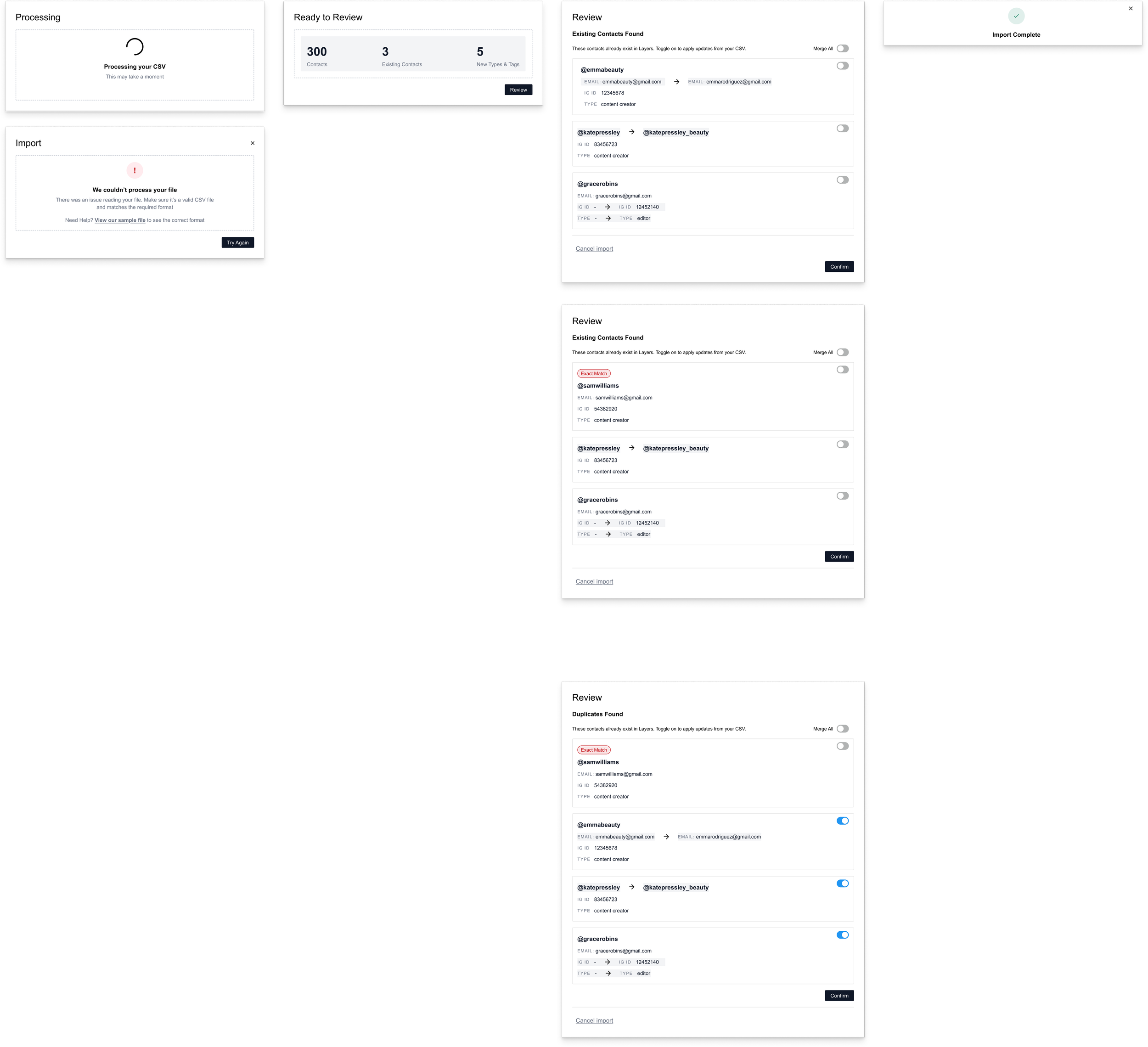
Full CSV Flow Designs
I've been working on a CRM platform for beauty and lifestyle brands managing influencer relationships. A lot of the work has been focused on dashboard design, contact management, and filtering systems.
One of the core features of this platform is the ability to upload a CSV to import contacts in bulk. I was tasked with taking the client's initial wireframes and translating them into production-ready designs.
Reframing the problem, not just the design
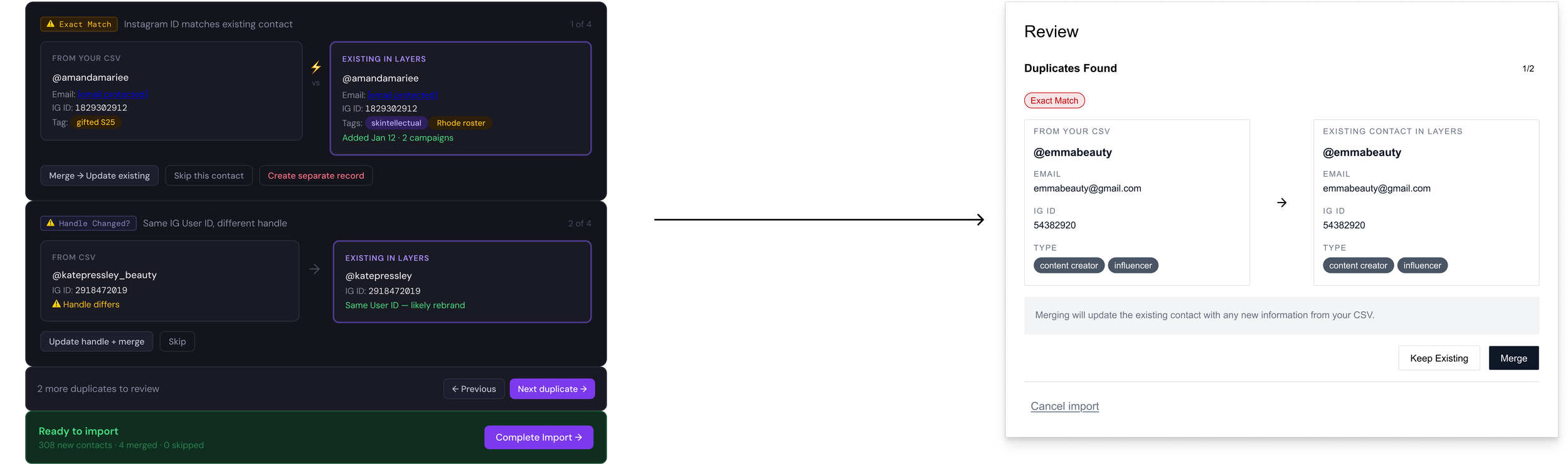
Left: Client’s original wireframe. Right: My designs, based on the client’s wireframes and translated into our established design language.
The client's wireframes treated duplicate contacts as a specific state that needed its own handling. A user would upload a CSV, the system would flag duplicates one by one, and the user would decide what to do with each. Straightforward enough on paper, and my first pass followed the same structure.
But as I sat with it, something felt off. The flow was splitting users' attention across two separate states: exact matches and partial duplicates. Each required a different decision, at exactly the moment when users needed clarity most.
So I stepped back and asked a simpler question: what is a user actually trying to do here? They've uploaded a CSV. Some of those contacts already exist in the system. They need to decide: update those records with new data, or leave them as-is.
Once I framed it that way, a lot of the complexity fell away. Exact matches, where every field is already identical, don't require user input at all. They can be handled silently. What actually matters are partial matches: contacts that exist but have new or updated information coming in. I renamed this step "Existing Contacts Found," which maps directly to what users are seeing and deciding on, rather than the more technical framing of "duplicates."
Designing for scale before it becomes a problem
With the framing cleaner, I ran into the next issue. My original design presented contacts one at a time. You'd review a match, make a decision, move to the next. For a small import this is fine. For anything larger, it becomes genuinely painful.
I redesigned the review step as a list-view modal with individual toggles for each contact, plus a "Merge All" option at the top for users who want to accept everything at once. Updates are displayed inline so users can see exactly what's changing before they commit. The goal was to make large imports feel manageable without taking control away from users who want to be careful.
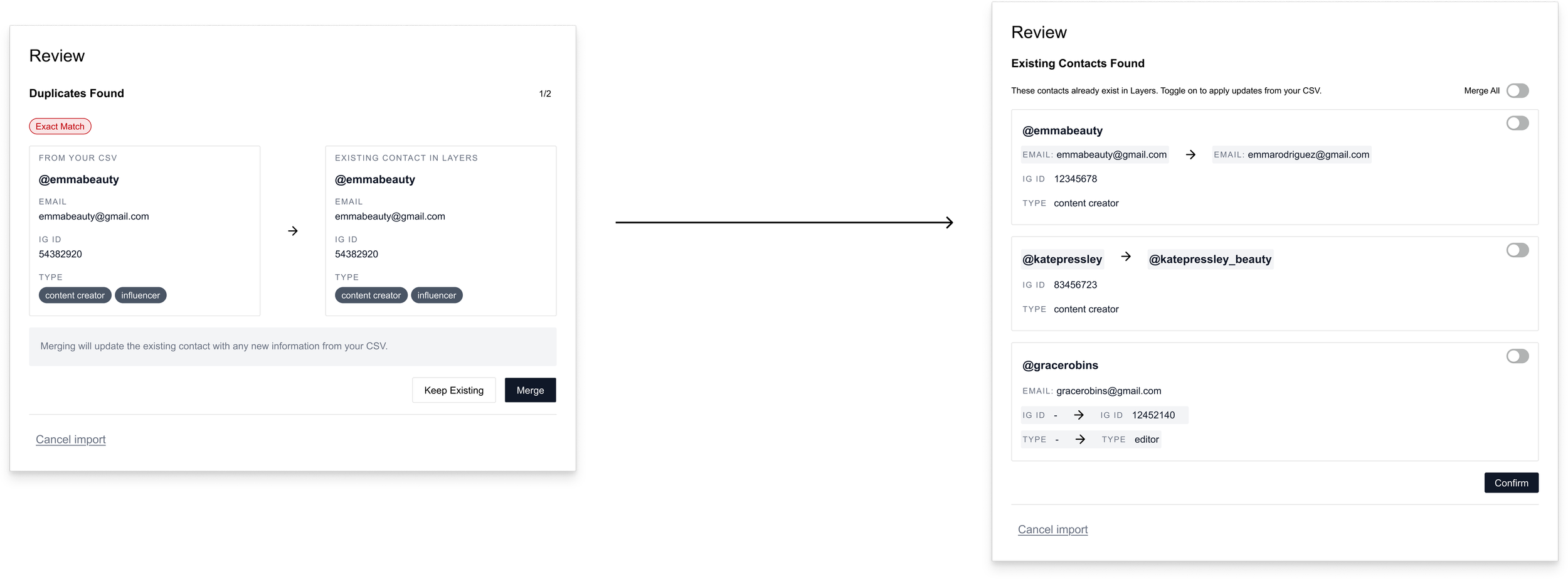
First iteration vs. second iteration, after designing for scale.
Flagging a product risk before it became one
We had also planned to let users assign new tags during the import flow. But as I started designing that section, I realized it could introduce a problem I didn't want to hand off to the client or the developer.
Tags created mid-import, when users are focused on getting data in rather than maintaining a tidy system, could quickly lead to redundant, inconsistently named, or just wrong tags being added to the system. And since we weren't using field mapping for CSV imports, there was already a real chance of users mislabeling the four hardcoded categories in their CSV. Layering tag creation on top of that felt like setting the system up to get messy (and complicated) fast.
For MVP, I recommended keeping tag creation exclusively within the platform's settings and limiting it to admins. The client agreed. It kept the import flow focused, and gave the tag system a better chance of staying organized as the platform scaled.